Only available in Pro & Premium Plans
At hoo.be, we’re dedicated to helping creators grow and monetize their audience seamlessly. With our built-in tipping feature, you can collect direct support from fans and followers — perfect for funding projects, highlighting content, or simply strengthening the creator–fan connection.
Easily Accept Tips from Your Audience
Turn your hoo.be page into a revenue stream by allowing fans to support you with quick and easy tipping.
- 💰 Receive direct support for your projects, content, or creative work.
- 🔥 Setup is simple — just connect Stripe once to start receiving payouts
- 📊 Track earnings easily from the Insights tab.
Getting Started: How to Enable Tips
Our new tipping system, powered by Stripe allows you to accept payments effortlessly. Here’s how to set it up:
1. Connecting Your Stripe Account
To get started earning, you’ll need to connect your Stripe account:
- Go to Settings → Payment.
- Click Connect under Stripe.
- Follow the prompts that follow to connect your account.
- Click Create—you're now set up to receive payouts and activate your tip block.
2. Add the Tips Block
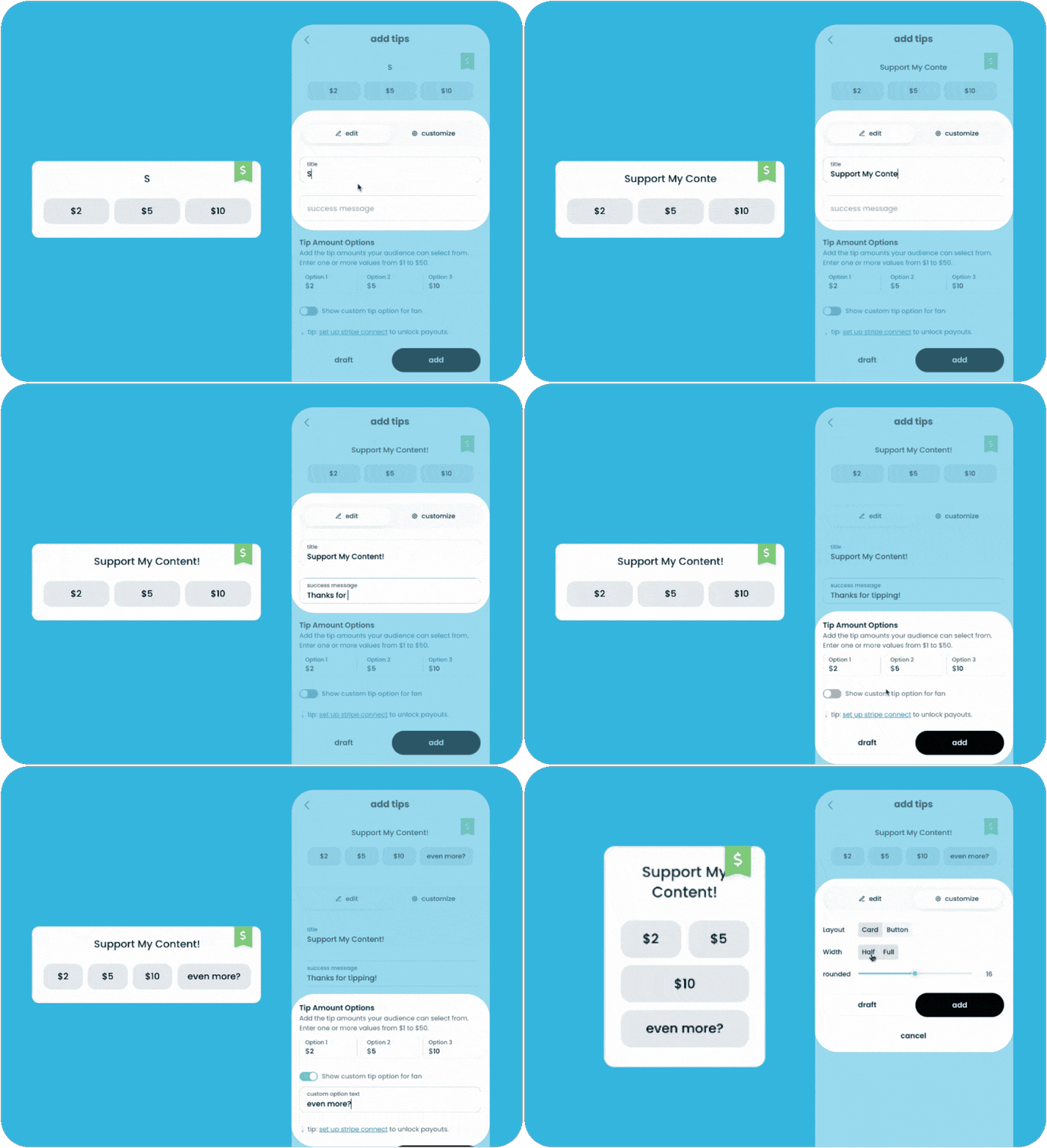
- Log in to your hoo.be account.
- Click "+" → Earn & Grow → Tips
- Customize your tips block:
- Add a title and success message.
- Set predefined tip amounts (from $1 to $50).
- Optionally enable a custom tip amount for fans.
- Click Add to activate your tipping feature.
Managing & Tracking Your Earnings
Stay informed about your earnings and audience engagement through Insights:
- View total tips received over time.
- Monitor supporter trends to understand your audience.
- Export reports for easy tracking.
📌 Note: We hold funds once received for 30 days to prevent fraud and ensure transaction security. After this period, funds become available for payout.
Spread the Word & Start Earning!
Now that your tipping feature is live, here’s how to maximize your earnings:
- 🔗 Share your hoo.be link on social media & in your bio.
- 🚀 Encourage fans to tip for exclusive shoutouts or content.
- 💬 Engage with supporters and thank them personally.
Questions? Reach out to hi@hoo.be for support.