Easily showcase your content from your favorite platforms with hoo.be embeds! Whether it’s your latest YouTube video, top TikTok, must-hear Spotify track, or a new product drop, you can seamlessly integrate it all into your profile.
How Embeds Work
- Profile Embeds: Add a link to your profile (e.g., YouTube, TikTok, Spotify), and it will auto-update with your latest content.
- Post/Content Embeds: Add a specific video, song, tweet, or event—this embed stays static unless manually changed.
How to Add an Embed
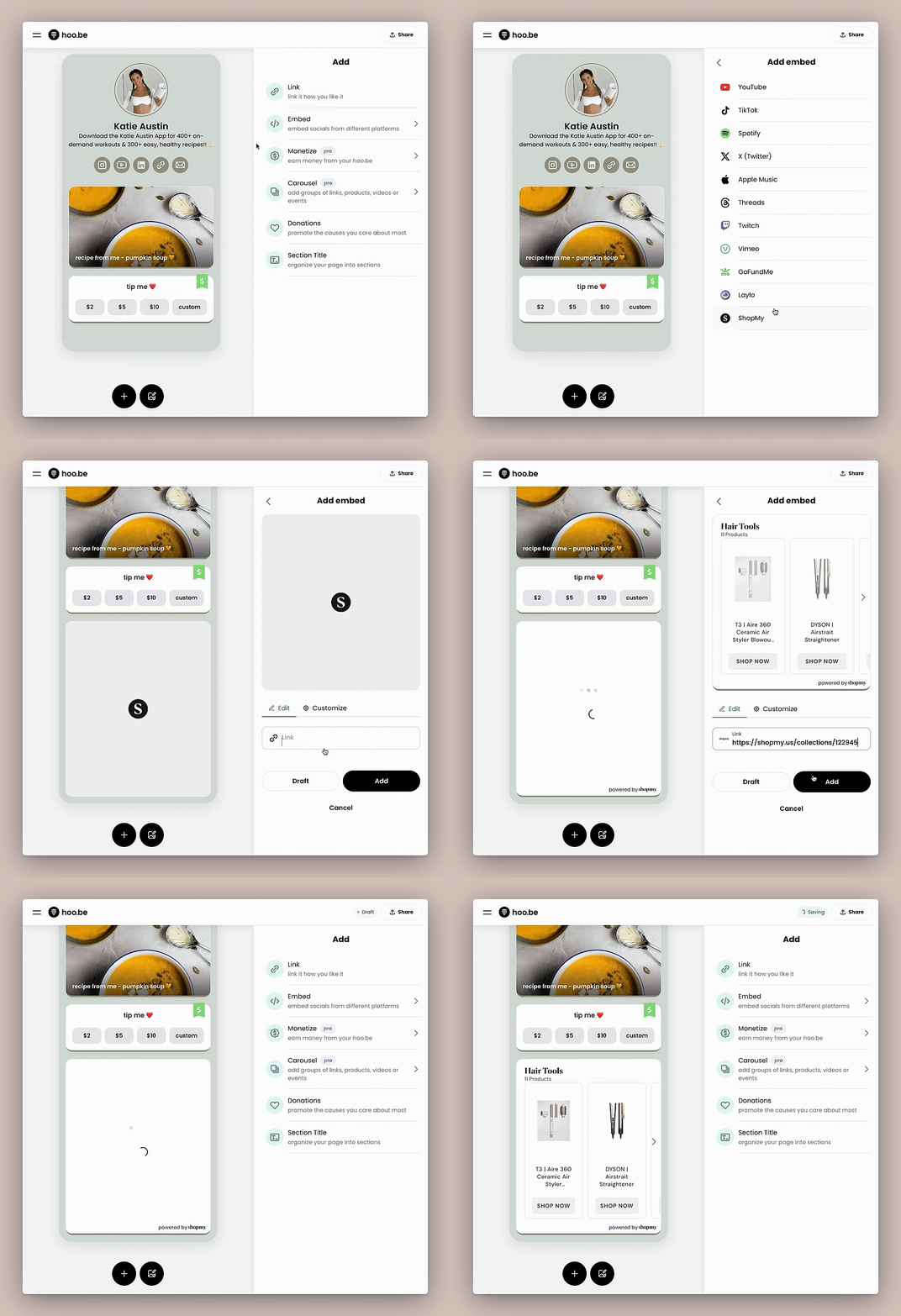
1️⃣ Click "+" on your hoo.be page
2️⃣ Select "Add Embed"
3️⃣ Choose your platform (YouTube, TikTok, Spotify, etc.)
4️⃣ Paste the link to your profile or specific content
5️⃣ Click Settings to customize appearance
6️⃣ Click Publish
That’s it—your embed is live! 🎉
Supported Platforms & Use Cases
🎥 YouTube
Use It For: Auto-updating your page with the latest video or embedding a specific upload.
✔ Embed a YouTube Channel → Auto-updates with your newest video.
✔ Embed a Specific Video → Always displays the selected content.
🔗 How to Add: Paste your YouTube channel link or video URL and click “Embed.”
🎵 Spotify & Apple Music
Use It For: Showcasing your latest music, podcasts, or playlists.
✔ Embed an Artist Profile → Auto-updates with your latest release.
✔ Embed a Playlist or Album → Displays and updates dynamically.
✔ Embed a Podcast → Auto-updates with your latest episode.
🔗 How to Add: Copy the link to your profile, playlist, or episode, paste it, and click “Embed.”
🎭 TikTok & Twitch
Use It For: Displaying your best content or latest live stream.
✔ Embed a TikTok Profile → Auto-updates with your latest posts.
✔ Embed a Specific TikTok Video → Highlights one post.
✔ Embed a Twitch Channel → Shows your live stream with optional chat.
🔗 How to Add: Copy your TikTok profile URL or Twitch stream link, then embed.
📅 Ticketmaster & GoFundMe
Use It For: Selling event tickets or raising funds.
✔ Embed a Ticketmaster Event → Let fans buy tickets directly.
✔ Embed a GoFundMe Page → Make it easy for followers to donate.
🔗 How to Add: Search for your event or campaign link, copy it, and embed it.
🛍️ ShopMy & Laylo
Use It For: Driving sales and product drops.
✔ Embed a ShopMy Collection → Let fans shop your recommendations.
✔ Embed a Laylo Drop Page → Notify fans about upcoming releases.
🔗 How to Add: Copy your ShopMy or Laylo link, then embed it.
💬 X (Twitter) & Threads
Use It For: Showcasing key posts or latest updates.
✔ Embed an X Profile → Displays your latest tweets.
✔ Embed a Single Post → Feature a viral or pinned post.
✔ Embed a Threads Post → Keep your audience engaged.
🔗 How to Add: Copy the link to your profile or post, then embed it.
Customization & Settings
- Click "Settings" after embedding to customize layout & design.
- Adjust size, background, and appearance for a seamless profile look.
Need Help?
📩 Email us at hi@hoo.be if you have any questions or need assistance with embeds!